GridBead is a free perler bead pattern maker and generator for midi fuse beads. Upload a photo or draw on the pegboard grid, match each cell to a real bead color, and export a chart you can place by hand. The same studio counts beads, shows a shopping list, and keeps the chart on one page so you are not switching between a paint program and a spreadsheet.
What Is a Perler Bead Pattern Maker
A fuse bead chart is a grid. Each filled cell is one bead, each empty cell is a hole you skip, and each color maps to a brand code you can buy. Without a chart, people squint at a picture and guess where the outline ends. The chart is the plan, not the iron: it decides the grid before any bead touches the board.
Midi beads are the common 5 millimeter size used on the large square pegboards sold with Perler beads and with Hama beads. Mini beads are smaller, about 2.6 millimeters, and they need a mini board. This studio plans midi charts. A 29 by 29 midi board is the unit most craft stores stock, so the default canvas and the photo converter both offer that size first.
Drawing and generating are two ways into the same grid. The pen, eraser, fill, and eyedropper tools are for pixel art you invent: badges, simple animals, letters, and icons. The generator path starts from a picture. It samples the photo down to the bead grid, snaps each cell to the nearest swatch in the palette you picked, and drops that result onto the canvas. You can then fix ears, eyes, and outlines by hand. Treat the generator as a first draft, not as a finished piece.
How to Turn a Photo into a Perler Bead Pattern
Photos fail as bead charts when the subject is small, the background is busy, or too many colors survive the shrink. Use the image to perler bead pattern page when the picture is the starting point. A face in a crowd, a pet on a patterned blanket, or a sunset with twenty similar oranges will become noise. Crop tight. Leave a plain backdrop. If you can describe the shape in one sentence, the converter has a chance.
Upload a clear photo
Open Convert Image and upload a PNG or JPG. Pick a picture with one obvious subject, a simple background, and strong contrast between the shape and the empty space around it.
Choose the pegboard grid
Set the chart to one 29 by 29 board, a 14 by 14 mini coaster, a 58 by 29 pair, or a 58 by 58 square. You can also type a custom size from 8 to 116 beads on each side.
Match a bead palette
Choose Perler, Hama, or Artkal beads, then move brightness, contrast, and saturation until the preview uses a small set of colors you actually own. Leave dithering on for photos and turn it off for flat logos.
Load the chart and export it
Load the pattern into the studio, read the bead count for each color, and export a printable sheet with symbols. Place beads from that sheet, or follow the same chart in the bead-along view.
After the chart loads, scan for single beads that do not touch a neighbor of the same color. Those specks are hard to see on a board and they melt into blobs. Clear them, thicken any outline that dropped to one bead wide, and only then export. Outlines in a dark bead, often black, are what make a pixel bead readable from across a table.
Dithering scatters nearby colors so a photo gradient survives at a tiny size. It looks more photographic and it is slower to place, because neighboring cells keep changing codes. Flat icons, sports numbers, and simple animals usually look better with dithering off and with contrast pushed up. Portraits and landscapes can keep dithering on, then have their speckles cleaned by hand.
Bead Grid Size and Pegboard Tips
Pegboards interlock on the edges. One board is 29 by 29 holes. Two boards side by side are 58 by 29. Four boards in a square are 58 by 58. The converter offers those presets because they match boards you can buy, not because every drawing should fill every hole. Set the size in the perler bead pattern maker before you sort cups of beads, or you will tape a piece that does not fit the boards on your table.
A 29 by 29 grid has 841 cells. At 5 millimeters per midi bead, the fused square is about 14.5 centimeters on a side, a little under 6 inches, before you count any slight shrink from the melt. A 14 by 14 mini coaster is 196 cells and about 7 centimeters across. A 58 by 29 banner is two boards and 1,682 cells. A 58 by 58 square is four boards and 3,364 cells. Empty background cells still take time if you insist on filling them with white beads, so decide early whether the background is a bead or a hole.
Leave a one-bead margin when the design is a gift that will be fully fused and handled. Beads on the extreme edge chip more easily, and the interlocking tabs of the pegboard are easier to tape if the artwork does not run into the join. For a sprite that is already 16 by 16, drop it in the middle of a 29 by 29 board instead of scaling it up until it touches the rim. Scaling up does not add detail. It only makes each block larger.
Multi-board pieces need a plan for the seam. Tape each board, but keep the design aligned before you peel. A line of contrasting beads along the join makes a misaligned seam obvious while you can still fix it. If the calculator says you need four boards and you only own two, shrink the chart. Do not start a 58 by 58 piece and hope the extra boards appear before the iron comes out.
Weight is a planning number, not a shipping quote. A midi bead is roughly 0.07 grams, so 841 beads are near 60 grams of plastic before you add backing, a key ring, or a magnet. Mini beads are much lighter and much slower to place. If the project is a wearable, a heavy full board on a thin shirt pulls the fabric. Prefer a smaller grid for pins and charms.
Perler, Hama, and Artkal Color Matching
Perler, Hama, and Artkal each publish their own codes. A red from one brand is not guaranteed to match a red with a similar number from another. Melt behavior differs too: some beads soften sooner, and mixing brands in one piece can leave a bumpy surface even when the colors looked close in the tray. Pick one brand for a project unless you have already compared the actual beads in daylight.
The bead color chart lists swatches with codes, names, and hex values, and it suggests the nearest color in the other brands. Nearest is a math match on the screen color, not a promise that the plastic will look identical after it melts. Hold the real beads next to a window before you substitute. Batches of the same code can also shift slightly from year to year, so a stash you bought earlier may not match a new bag of the same code.
Limit a first chart to colors you already own. The converter can target a palette, and the stash list can hide codes you do not have. A portrait that secretly needs twelve near-whites will stall the moment you run out of the third white. Fewer colors also make the printed symbols easier to follow. Three to six codes is a comfortable place for a gift. Ten or more belongs on a piece you are willing to place over several sittings.
When two swatches are close, give them different symbols on the export. Print the code next to the symbol. Sorting cups before you sit down matters more than buying a larger tray. Label each cup with the code, not only with a color name, because names such as red or blue are shared by several codes inside one brand.
Pattern Examples with Bead Counts
The free perler bead patterns in the gallery are sized to sit on a standard board. Convert your own picture with the image to perler bead pattern tool, then compare the result with these three are already built, with the bead totals taken from the grids themselves. Open one, recolor it, or use it as a size reference before you convert a photo of your own.
Spotted mushroom, 16 by 16
This easy chart is 16 beads wide and 16 beads tall. It uses 208 beads in 3 colors: a dark outline, a red cap, and white spots. It sits inside a single 29 by 29 pegboard with room around the edges, so you can tape it without running into the interlocking tabs. It is a good first fuse because the outline is continuous and there are no tiny isolated beads.
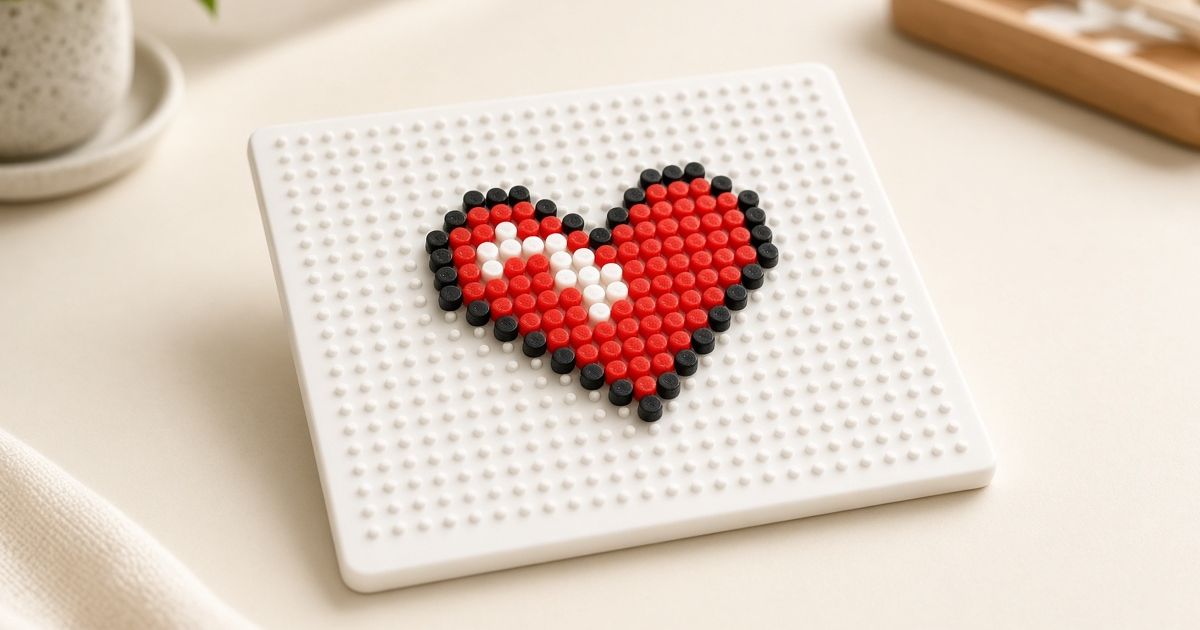
Pixel heart, 15 by 13
The heart is 15 beads wide and 13 beads tall, 124 beads, and 3 colors. The footprint is smaller than the mushroom, which makes it a better pin or magnet than a wall piece. Because the shape is recognizable even at a glance, you can swap the fill color without redrawing the outline. Keep the outline darker than the fill so the lobes do not merge when the plastic softens.
Strawberry donut, 16 by 16
This medium chart is 16 by 16 and uses 222 beads across 7 colors. The extra colors are what make it slower: frosting, topping, and outline each need their own cup. It still fits on one board. If seven codes feels like too many for a first afternoon, recolor the toppings into one shade before you start placing. The grid does not have to stay in the original palette.
None of these fills a whole board. That is deliberate. A design with a margin is easier to tape, easier to peel, and less likely to warp the pegboard if you ever iron too close to the plastic. When you want a larger piece, scale by adding boards, not by stretching a 16 by 16 drawing until every block is four beads wide. Stretching hides the pixel character that makes a fuse bead chart look crisp.
Questions Before You Start
How many fuse beads fit on one 29 by 29 pegboard?
One standard square pegboard holds 29 beads on each side, which is 841 holes. A filled board uses 841 beads. Most drawings leave the outer holes empty, so a 16 by 16 motif often needs about 150 to 220 beads instead of a full board.
Can I turn a phone photo into a fuse bead chart for free?
Yes. Upload a PNG or JPG in the converter, pick a grid size, and match it to Perler, Hama, or Artkal colors. The chart, the bead counts, and the printable export stay in the browser and do not require an account.
Do Hama beads use the same color codes as Perler beads?
No. Perler codes such as P05 and Hama codes such as H05 are not the same recipe, even when the numbers look alike. Use the bead color chart to find the nearest Hama or Artkal swatch before you buy a substitute.
What grid size should a first fuse bead project use?
Start with a design that fits inside one 29 by 29 board, ideally 16 by 16 or smaller, in three to five colors. A mini 14 by 14 coaster is even faster. Wide 58 by 29 charts and 58 by 58 squares are easier after you have ironed a single board flat.
Should I print colors or symbols on a bead pattern?
Print symbols when the piece uses several close shades, such as two reds or two blues. A color-only print shifts under warm room light, and two neighboring swatches can look the same on paper. Symbols stay readable next to the color name and the bead code.
Why does my photo turn into speckled single beads?
Busy backgrounds and low contrast create isolated beads that are hard to fuse into a shape. Crop the subject, raise contrast, and turn dithering off if you want flat fields of color. The studio can also clear stray single pixels after the chart is loaded.
When the grid, the color list, and the board count all look reasonable, return to the perler bead pattern maker at the top of this page and export the sheet. If the chart should scan as a link instead of a picture, build it with the fuse bead QR code tool, then place that grid the same way you place any other pattern.